Geyser (Bedrock)
Accept Bedrock Edition players on a Java server through Geyser, behind Infinity-Filter.
Geyser is a protocol bridge that lets Bedrock Edition players join a Java Edition server. With Infinity-Filter in front, both Java (TCP) and Bedrock (UDP) traffic are filtered before reaching your backend.
Why Bedrock needs a dedicated IP
Bedrock’s UDP packets only carry the client IP — they don’t include the connected hostname. Domain-based filtering is impossible the way it is for Java, so each Bedrock setup needs a unique IP to be unambiguously identified at the edge.
Step 1 — Order a dedicated IP
Follow the Dedicated IP order flow. You receive a CNAME of the form <uid>.ip.infinity-filter.com — that’s what you’ll use for both DNS and the module backend.
Step 2 — Add the Geyser module backend
On Network → Backends, click Add backend → pick Geyser in the type dropdown.
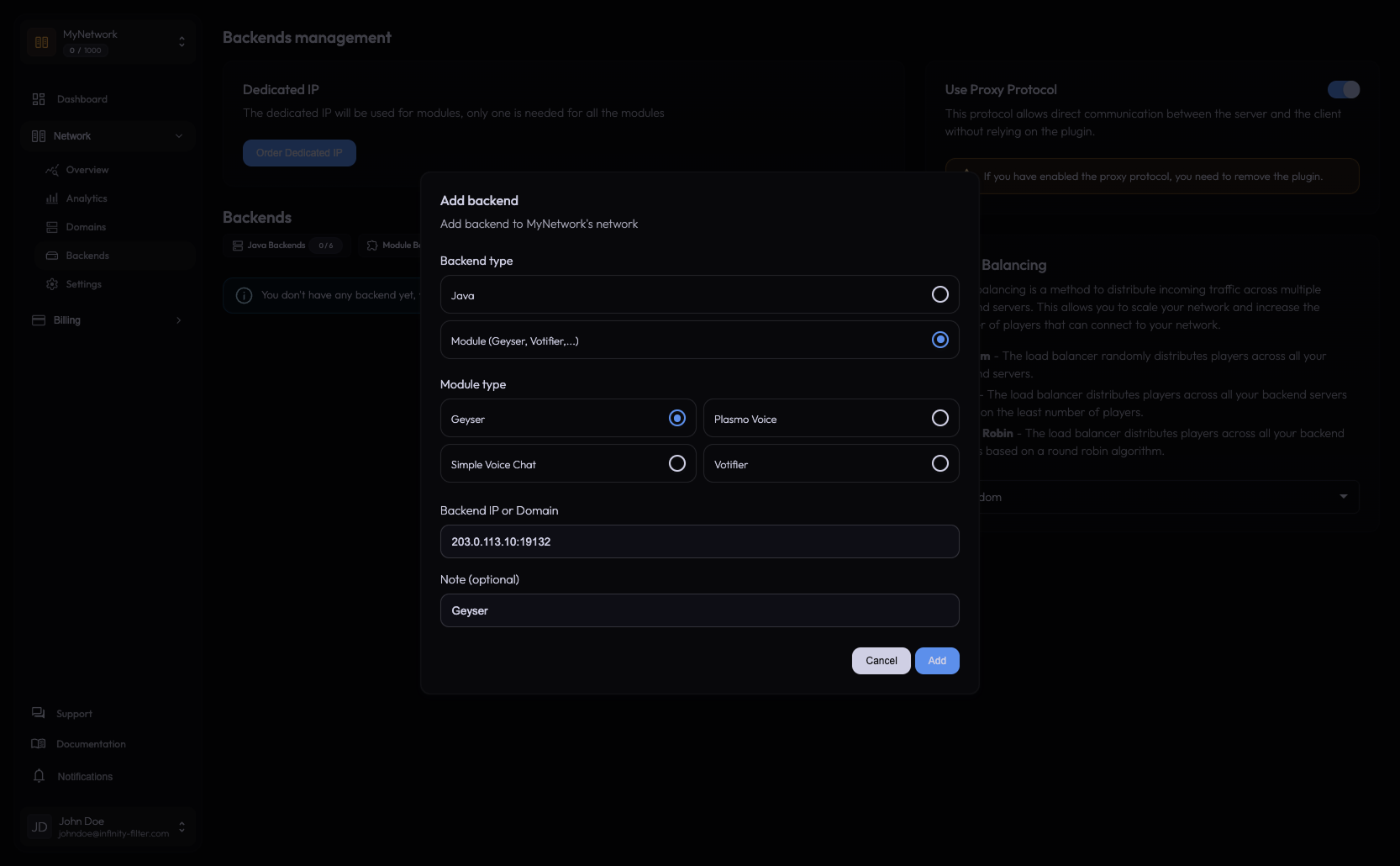
Two things to know:
- Bedrock load balancing is not supported. A network can have one Geyser module forwarding to one backend.
- Multi-proxy setups need Geyser on every proxy. If only one of several proxies has Geyser installed, Bedrock players routed to the other will fail to connect.
Step 3 — DNS
Create a CNAME on a Bedrock-conventional subdomain (bedrock, mobile, be or mcpe) pointing at the dedicated CNAME. Cloudflare orange-cloud OFF.
bedrock.example.com. 300 IN CNAME {uid}.ip.infinity-filter.com.
No SRV needed. Don’t add this subdomain in the panel’s Domains table — Bedrock subdomains aren’t added there. See DNS setup for the full reference.
Step 4 — Configure Geyser
The PROXY-protocol options in Geyser are confusing because three distinct knobs exist with overlapping names. With Infinity-Filter the correct mapping is:
bedrock.enable-proxy-protocol Only for a UDP reverse proxy directly in front of Geyser. IF isn't one.
bedrock.proxy-protocol-whitelisted-ips Has no effect unless the above is true.
remote.use-proxy-protocol Forwards real client IPs from Geyser to the Java backend.
advanced.bedrock.use-haproxy-protocol Accepts the HAProxy PROXY header IF sends on UDP.
advanced.java.use-haproxy-protocol Mirror of the above for the Java path.
haproxy-protocol-whitelisted-ips Required when advanced.bedrock.use-haproxy-protocol is true.
bedrock.broadcast-port Advertised in MOTD ping responses. If Geyser runs on a non-default port and this is wrong, Bedrock clients ignore the ping.
allowed-IPs Do NOT restrict — IF filters upstream, restricting here breaks connectivity.
Sample configs
Use when IF PROXY protocol is enabled and the IF plugin is not installed:
remote:
  address: {java-backend-ip-or-localhost}
  port: {java-backend-port}
  auth-type: floodgate   # or online / offline
  use-proxy-protocol: true
bedrock.enable-proxy-protocol MUST be false when IF is upstream:
bedrock:
  address: 0.0.0.0
  port: {geyser-udp-port}
  enable-proxy-protocol: false
  # proxy-protocol-whitelisted-ips: [ "{IF-range-1}", ... ]   # optional if OS-level firewalling isn't possible
Enable both flags together, in lockstep with PROXY protocol on Velocity AND on the IF Backends page:
advanced:
  bedrock:
    use-haproxy-protocol: true
  java:
    use-haproxy-protocol: true

haproxy-protocol-whitelisted-ips:
  - "{IF-range-1}"
  - "{IF-range-2}"
Step 5 — (Standalone Geyser only) Infinity-Filter plugin
If Geyser runs as a standalone process (not as a plugin), and you’re using the Infinity-Filter forwarding plugin instead of PROXY protocol, enable Geyser support in the plugin config:
allow-external-connections: true
geyser-support: true
If you’re using PROXY protocol, this section doesn’t apply.
Step 6 — Floodgate
Floodgate goes on the proxy only, never on backend servers. It allows Bedrock players to authenticate without a Java account; the proxy handles the bridge.
Key facts
Bedrock connection port Always 19132 on the IF side. Players never specify a port; the backend Geyser port is internal and can be anything. There is no need to expose 19132 on the backend.
End-to-end real IP Requires use-haproxy-protocol: true in both advanced.bedrock AND advanced.java, PROXY protocol on Velocity/BungeeCord, and PROXY protocol on the IF Backends page. No single top-level flag.
use-haproxy-protocol = IF wire format Setting it in Geyser/Velocity is how IP forwarding is enabled. You do NOT need to install HAProxy yourself.
IF does not authenticate Bedrock Authentication is the customer's proxy stack (Floodgate, etc.).
Diagnostic recipes
”Header length exceeds allowed maximum” on Geyser
The PROXY header isn’t being accepted. Check haproxy-protocol-whitelisted-ips includes the IF ranges and the Geyser version supports the header.
Bedrock cannot connect, Java still works
After enabling PROXY protocol or after a dedicated-IP migration:
bedrock.enable-proxy-protocolistrue(conflicts with IF). Set it tofalse.- The Bedrock CNAME still points at the old dedicated IP. Update it, allow a few minutes for DNS.
”Trouble establishing a connection to multiplayer services” through IF, direct works
One of:
- Empty
haproxy-protocol-whitelisted-ipswhileadvanced.bedrock.use-haproxy-protocol: true. Whitelist IF ranges. - Backend firewall blocking UDP 19132 from IF ranges. Allow them.
- Stale Geyser backend module. Delete and re-add the Geyser module backend in the panel — this clears silent routing inconsistencies where the tunnel looks up but no UDP forwards.
End-to-end Bedrock real-IP not visible on the Java backend
Check all three layers: use-haproxy-protocol: true in advanced.bedrock AND advanced.java, PROXY protocol on Velocity/BungeeCord, PROXY protocol on the IF Backends page.
Geyser startup warns about HAProxy protocol expected
use-haproxy-protocol set incorrectly in advanced. Set advanced.bedrock.use-haproxy-protocol: false (IF does not send HAProxy headers to the Geyser UDP listener by default). Set advanced.java.use-haproxy-protocol: true only if PROXY protocol is enabled on Velocity/BungeeCord.
Bedrock module suddenly stopped after a subscription renewal
Billing has been observed to wrongly flag the dedicated IP for cancellation during renewal. The dedicated IP needs to be re-enabled platform-side — open a ticket.
What’s next
Last updated: May 28, 2026