PlasmoVoice
Voice chat with PlasmoVoice behind Infinity-Filter.
PlasmoVoice is a voice-chat mod for Minecraft. Infinity-Filter supports it as a first-class module backend, so voice traffic is filtered and your backend IP stays hidden.
Setup overview
Players → IF dedicated IP (UDP) → Velocity/BungeeCord (PlasmoVoice proxy plugin) → Spigot backends (PlasmoVoice server plugin)
The dedicated IP receives voice UDP traffic at the edge and forwards it to the proxy. The proxy distributes voice to the right backend Spigot servers.
Step 1 — Order a dedicated IP
Follow the Dedicated IP order flow. You receive a CNAME of the form <uid>.ip.infinity-filter.com — that’s what you’ll use for the plugin config and the module backend.
Step 2 — Add the PlasmoVoice module backend
On Network → Backends, click Add backend → pick PlasmoVoice in the type dropdown.
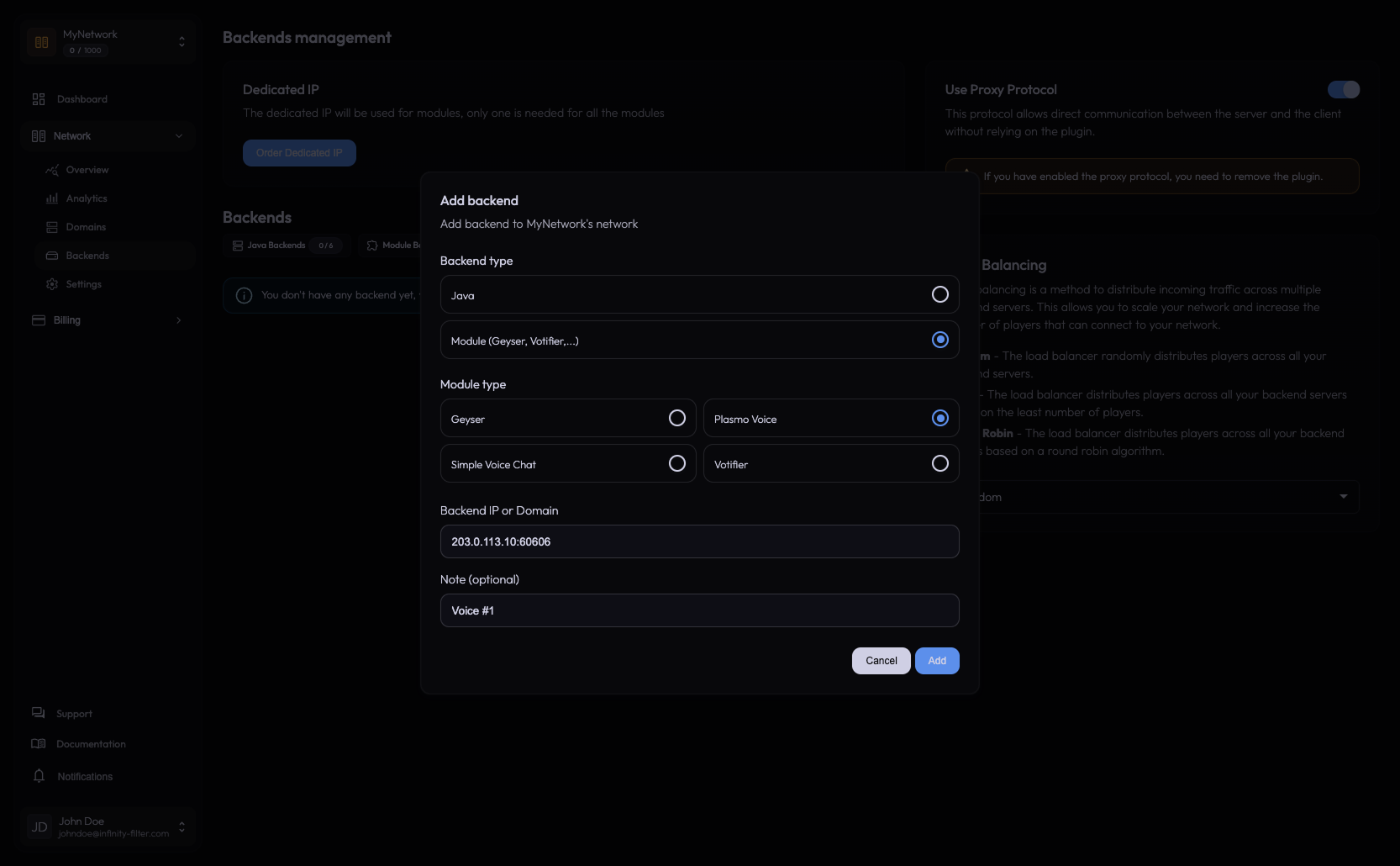
Enter the backend ip:port:
- IP — the proxy’s IP (Velocity or BungeeCord).
- Port — the proxy plugin’s listening UDP port — not the per-Spigot port.
This is the most common point of confusion. Use the proxy-side port, not the backend Spigot port.
Step 3 — Install PlasmoVoice
- On the Velocity / BungeeCord proxy: install the PlasmoVoice proxy plugin.
- On each Spigot backend: install the PlasmoVoice server plugin.
- Optional: install the PlasmoVoice mod in the client if you want extra features beyond the in-game chat.
Step 4 — Configure the public host
PlasmoVoice’s server config uses a [host] section with an ip and port, plus optional proxy_ip / proxy_port keys to advertise a public address that differs from the bind address. When you sit behind Infinity-Filter, the public address is your dedicated-IP CNAME — players connect to that, not to your backend.
On the Velocity PlasmoVoice proxy plugin:
[host]
ip = "0.0.0.0"                              # bind on all interfaces
port = 60606                                # the listening UDP port
proxy_ip = "{uid}.ip.infinity-filter.com"   # the dedicated-IP CNAME
proxy_port = 30010                          # the port shown on the panel's PlasmoVoice backend (30010-30020)
On the BungeeCord PlasmoVoice proxy plugin:
[host]
ip = "0.0.0.0"                              # bind on all interfaces
port = 60606                                # the listening UDP port
proxy_ip = "{uid}.ip.infinity-filter.com"   # the dedicated-IP CNAME
proxy_port = 30010                          # the port shown on the panel's PlasmoVoice backend (30010-30020)
On every Spigot backend, set proxy_ip to the same dedicated-IP CNAME as above. Only the listening port may differ per server.
[host]
ip = "0.0.0.0"                              # bind on all interfaces
port = 60606                                # the listening UDP port — may differ per backend
proxy_ip = "{uid}.ip.infinity-filter.com"   # same CNAME everywhere
proxy_port = 30010                          # the port shown on the panel's PlasmoVoice backend (30010-30020)
The proxy_ip is your dedicated-IP CNAME ({uid}.ip.infinity-filter.com), used directly — no DNS record needed for voice. The proxy_port is the port shown on the panel’s PlasmoVoice backend — Infinity-Filter assigns PlasmoVoice ports from the 30010–30020 range (Simple Voice Chat uses 30030–30040). The same values go everywhere — that’s what tells clients to connect via Infinity-Filter instead of hitting your origin directly.
Step 5 — Docker UDP port mapping
If your backend runs in Docker, the UDP voice port must be explicitly mapped to the host. Forgetting this is a common “voice silently doesn’t work” trap.
services:
  velocity:
    ports:
      - "25577:25577"
      - "60606:60606/udp"   # <-- the PlasmoVoice voice port (UDP!)
A correct voice_host with a missing UDP port mapping looks like everything is configured, but no UDP packet reaches the proxy. Confirm the mapping before debugging anywhere else.
Diagnostic recipe — “Voice silently doesn’t work, proxy_ip is correct everywhere”
Almost always one of:
- Docker UDP port not mapped. Add
60606:60606/udpto the proxy container. - Backend firewall blocks the UDP port. Allow the port from Infinity-Filter’s IP ranges.
proxy_ipmismatches on one Spigot backend. Re-check everyconfig.toml.
What’s next
Last updated: May 28, 2026