Votifier / NuVotifier
Receive votes from vote-listing sites without exposing your backend IP.
Votifier and its modern fork NuVotifier are how vote-listing sites deliver a vote to your Minecraft server. Infinity-Filter exposes a Votifier module backend so vote traffic goes through the edge — the voting site never learns your backend’s real IP.
Why use the Votifier module
Votifier traffic is only known to the voting site you registered with — most bot operators won’t bother probing for it. But once any voting site has your backend’s IP, that information leaks (their database, their logs, their public dumps, …).
The Votifier module proxies vote traffic through Infinity-Filter, so vote sites get a hostname pointing at the edge and never see the origin.
Step 1 — Order a dedicated IP
Follow the Dedicated IP order flow. You receive a CNAME of the form <uid>.ip.infinity-filter.com — that’s what you’ll use for both DNS and the module backend.
Step 2 — Add the Votifier module backend
On Network → Backends, click Add backend → pick Votifier in the type dropdown.
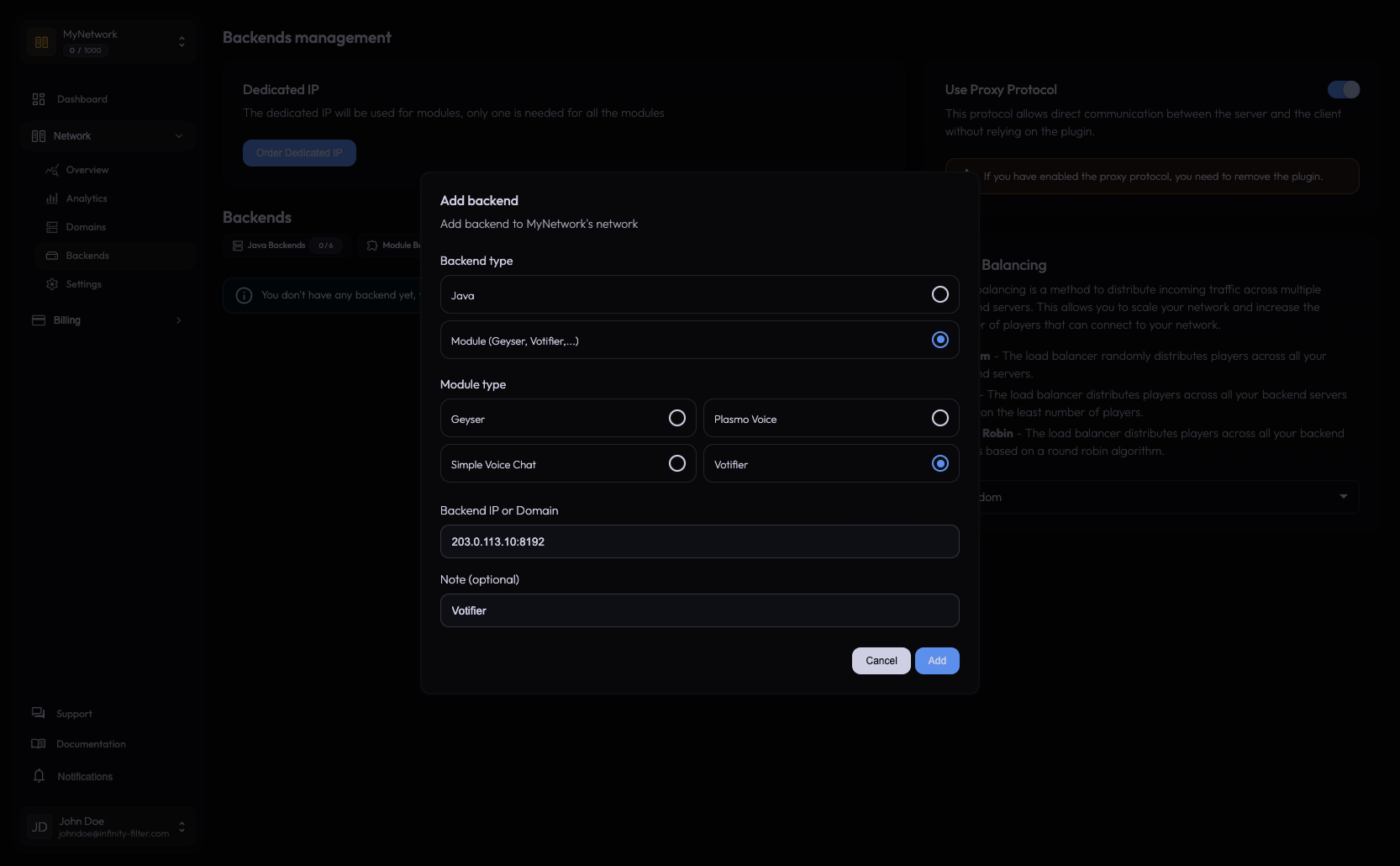
Enter the backend ip:port:
- IP — the IP of the server running (Nu)Votifier.
- Port — the Votifier listening port (default
8192).
The panel returns a “How to install” address — that’s what vote sites need to deliver votes to.
Step 3 — Install (Nu)Votifier on the backend
Install NuVotifier on the backend (typically on the Velocity/BungeeCord proxy, or on a single Spigot server if you don’t run a proxy). The plugin auto-generates its config the first time it starts — including an RSA key pair. The public key is what vote-listing sites need.
The config file location depends on your platform:
host = "0.0.0.0"
port = 8192
host: 0.0.0.0
port: 8192
The port must match what you typed in the Votifier module backend in step 2 (8192 by default). NuVotifier listens on host+port; Infinity-Filter receives votes from voting sites and forwards them to that address.
Step 4 — Update your vote-site listings
On each vote-listing site (TopMinecraft, MinecraftServers, …), edit your server entry:
- Server IP / Votifier IP → the address from the panel’s “How to install” card (not your backend IP).
- Public key → unchanged. The voting site encrypts the vote with this key, which only your (Nu)Votifier can decrypt.
The voting site connects to Infinity-Filter, which forwards the vote to your backend.
Step 5 — Test a vote
Trigger a test vote from the vote site’s “Test Votifier” button (most sites have one). Your backend (Nu)Votifier should log the vote.
Why there’s no separate Java backend
Votifier doesn’t need a Java module backend; the Votifier module on the panel handles the full vote-receiver role. You can have a network with only a Votifier module backend if you don’t have a Minecraft server attached — useful for separating concerns.
Diagnostic recipes
”Vote test fails on the site”
- Confirm (Nu)Votifier is running on the backend and listening on the port you set in the module.
- Confirm the backend firewall allows the Votifier port from the Infinity-Filter IP ranges — outbound from IF to the backend uses those ranges, not the module’s dedicated IP.
- Confirm the public key the voting site has matches the one (Nu)Votifier uses.
”Vote goes through but the rewards plugin doesn’t fire”
That’s a server-side issue — the vote was received, but your reward plugin isn’t configured. Not an Infinity-Filter problem.
What’s next
Last updated: May 28, 2026